Async JavaScript
Callbacks
A callback is simply a function passed as an argument to another function.
It is used when you want one function to run only after another has finished.
Why do we need callbacks?
JavaScript can do only one thing at a time. So if a task takes too long, like waiting for a timer or loading data, the whole program would get stuck. Callbacks help prevent this. They allow long tasks to run in the background so the rest of the code can keep running without stopping.
Simple callback example
function greet(name, callback) {
  console.log("Hello " + name);
  callback();
}

function done() {
  console.log("Greeting completed.");
}

greet("Farukh", done);
Output:
Hello Farukh
Greeting Completed.
Async callback example
setTimeout(function(){
  console.log("This message appears after 2 seconds");
}, 2000);

console.log("Print first");
First, the “Print first“ statement prints.
The callback inside setTimeout runs later. It runs after 2 seconds.
Synchronous vs Asynchronous JavaScript
JavaScript runs two ways:
Synchronous JavaScript
Synchronous code runs in order, one line at a time.
The next line waits until the current line is done.
If a task is slow, everything else stops until it finishes.
Examples:
Loops
Normal functions
Simple example of synchronous JavaScript:
console.log("A");
console.log("B");
console.log("C");
Output:
A
B
C
Asynchronous JavaScript
Asynchronous code does not stop the program.
It runs a task in the background and finishes later when the result is ready.
Examples:
setTimeout
fetch
promises
Simple example of asynchronous JavaScript
console.log("Start");

setTimeout(() => {
  console.log("This runs later");
}, 2000);

console.log("End");
Output:
Start
End
This runs later
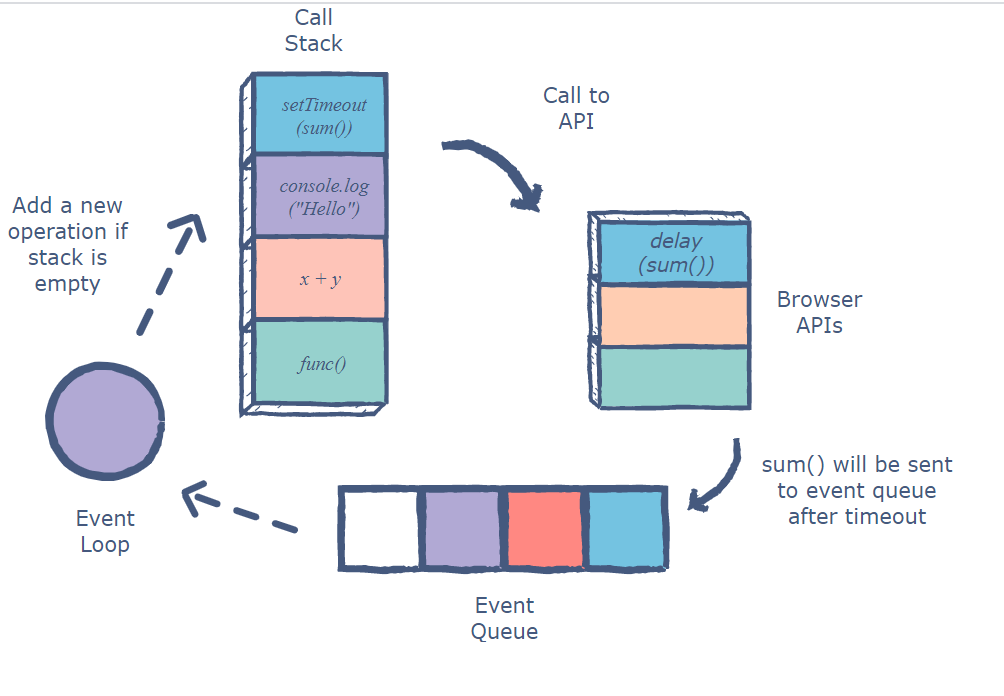
Event Loop
A mechanism that allows JavaScript to perform async operations despite being single-threaded.
Flow:
JS runs synchronous code on the call stack.
Web APIs handle the async operations.
Their callbacks go into the queues.
The event loop check:
- If the call stack is empty, then push the next callback/microtask to the stack.
Microtasks (promises) always run before callbacks (setTimeout).
Promises
A Promise in JavaScript is a special object that represents a task that will be completed at some point in the future. Instead of blocking the program while waiting for the result, a Promise allows the task to run in the background and lets you handle the result later.
A Promise has three states:
Pending
The async task has started but isn’t done yet.
Fulfilled
The task was completed successfully, and the Promise returns a value.Rejected
Something went wrong, and the Promise returns an error.
Simple Promise example
const myPromise = new Promise((resolve, reject) => {
  const success = true;

  if (success) {
    resolve("Task completed!");
  } else {
    reject("Task failed.");
  }
});

myPromise
  .then(result => console.log(result))
  .catch(error => console.log(error));
Output:
Task completed!
Promise with setTimeout
function waitForTwoSeconds() {
  return new Promise((resolve) => {
    setTimeout(() => {
      resolve("2 seconds passed!");
    }, 2000);
  });
}

waitForTwoSeconds().then(msg => console.log(msg));
Output:
2 seconds passed!
This prints after 2 seconds.
Promise chaining
Promises allow multiple async tasks to run one after another:
new Promise(resolve => resolve(5))
  .then(num => num * 2)
  .then(result => result + 3)
  .then(finalValue => console.log(finalValue));
Output:
13
Each .then() receives the result of the previous step.
Error Handling
If anything goes wrong, the .catch() Method handles it:
function getNumber() {
  return new Promise((resolve, reject) => {
    reject("Something went wrong!");
  });
}

getNumber()
  .then(num => console.log(num))
  .catch(err => console.log("Error:", err));
Output:
Error: Something went wrong!
The Promise fails, so the code goes directly to .catch().
Promise utility functions
Promise.resolve(value)
Create a resolved promise.
Promise.resolve(4).Promise.reject(value)
Create a rejected promise.
Promise.reject(“Error”).
Promise.all([…])
Runs all promises in parallel.
Fails if any fail.
Promise.allSettled([…])
Never fails.
Best for tasks when failure is acceptable.
Returns:{ status: “fulfilled”, value…}
{status: “rejected”, reason…}
Promise.any([…])
Returns the first successful promise.
Fails only if all promises fail.
Promise.race([…])
Returns the first promise that settles (fulfilled or rejected).
Good for implementing timeouts.